1. Controls Features
The CSFaaS Controls solution allows you to customise policies to meet the specific needs of your business. This ensures that your security and compliance initiatives are both effective and fully aligned with your organisational objectives.
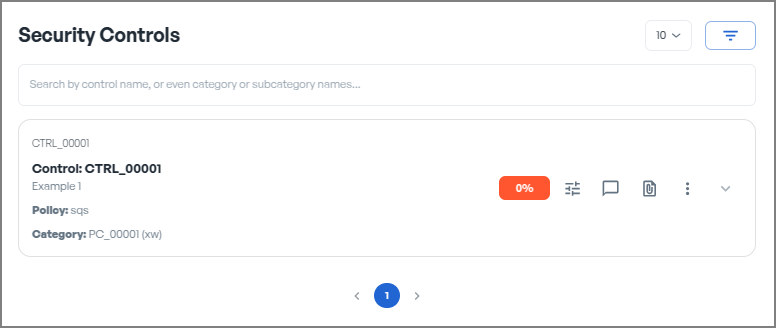
Key Features
Update the displayed control codes, names, and descriptions to accurately reflect their purpose.Edit Controls
Create additional controls to expand and enhance your policies as needed.Add New Controls
Remove outdated or unnecessary controls to keep your policies current and relevant.Delete Controls
Use drag-and-drop functionality to reorganise controls, improving the logical flow and structure.Reorder Controls
Move controls to a different category if necessary to maintain alignment and organisation.Reassign Controls to Another Category
Track the current and target progression levels for each control to ensure progress is aligned with strategic goals.Set Control Progression
Owners can be assigned to each Frameworks to ensure accountability and clarity.Assign Owners
Define the current and target maturity levels for each control to monitor progress and establish improvement goals.Set Control Maturity
Assign a weighting to controls to prioritise their impact or importance.Define Control Weighting
Specify the frequency of control reviews to maintain their effectiveness over time.Define the Periodicity Review for Each Control
Assign details such as functional domains, business units, and control ownership to ensure accountability.Define Organisational Information
Specify attributes such as information security property, control function, privacy control function, security domains, control type, and operational capabilities.Define Control Attributes
Attach supporting documentation (such as audit reports, procedures, or policies) to substantiate controls and ensure compliance.Add and Manage Evidence
Establish traceability by linking controls to framework categories or subcategories, enabling tracking of control completion at the framework level.Link Control Items to Frameworks
Facilitate collaboration by adding comments, documenting changes, and maintaining a history of modifications for transparency and accountability.Collaborate and Document
On This Page
Key Features
Edit Controls
Add New Controls
Delete Controls
Reorder Controls
Reassign Controls to Another Category
Set Control Progression
Assign Owners
Set Control Maturity
Define Control Weighting
Define the Periodicity Review for Each Control
Define Organisational Information
Define Control Attributes
Add and Manage Evidence
Link Control Items to Frameworks
Collaborate and Document
Found an issue?
Report issue